क्या आपने नोटिस किया है?
हर होली पर Instagram, Facebook और WhatsApp पर कुछ AI फोटो इतनी वायरल हो जाती हैं कि लोग पूछते रह जाते हैं – “ये कैसे बनाया?”
इस साल ट्रेंड साफ है — Holi Gemini Viral AI Photo Editing.
मैं पिछले 5 साल से AI photo editing niche में काम कर रहा हूँ। मैंने देखा है कि जो लोग सही तरीके से Gemini AI का इस्तेमाल करते हैं, उनकी फोटो सिर्फ लाइक नहीं पाती… वो वायरल होती है। और यही फर्क RPM और traffic में भी दिखता है।
आज मैं आपको वही पूरा सिस्टम बताने वाला हूँ — step-by-step. बिना फालतू बातों के।
Holi Gemini Viral AI Photo Editing आखिर इतना ट्रेंड में क्यों है?
होली सिर्फ रंगों का त्योहार नहीं है। ये visual festival है।
लोग चाहते हैं:
- रंगों से भरी cinematic फोटो
- 3D splash effects
- भगवान कृष्ण या राधा के साथ AI composition
- Slow-motion color burst look
- Royal, cinematic background
यहाँ पर Gemini AI का रोल शुरू होता है।
Google Gemini अब सिर्फ text generator नहीं है। सही तरीके से इस्तेमाल करो तो यह आपके ideas को ultra-realistic visual concept में बदल देता है।
Holi 2026 में क्या-क्या Viral हो रहा है? (Trend Breakdown)
मैंने इस साल के ट्रेंड्स analyze किए हैं। नीचे एक simple table देखिए:
| Trend Type | Engagement Level | Viral Probability |
|---|---|---|
| Radha-Krishna AI Holi Art | Very High | ⭐⭐⭐⭐⭐ |
| Cinematic Color Explosion Portrait | High | ⭐⭐⭐⭐ |
| Royal Holi King Look | Medium | ⭐⭐⭐ |
| Anime Style Holi Edit | Medium | ⭐⭐⭐ |
| Ultra Realistic 8K Splash | Very High | ⭐⭐⭐⭐⭐ |
सबसे ज्यादा चल रहा है:
- Divine + Realistic mix
- Face focus portrait
- Bright pink, blue, orange splash
Holi Gemini Viral AI Photo Editing कैसे काम करता है?
Simple भाषा में समझिए।
- आप concept सोचते हैं
- Gemini से visual description generate करते हैं
- उस description को AI image tool में डालते हैं
- Lightroom / Snapseed से final touch देते हैं
Done.
लेकिन…
वायरल होने के लिए बस इतना काफी नहीं है।
Pro-Tip Box – 90% लोग यही गलती करते हैं ❌
मैंने कई beginners को देखा है।
वे क्या करते हैं?
Generic description डाल देते हैं।
Result?
Flat image. No emotion.
Correct Approach:
- Lighting define करें
- Camera angle mention करें
- Emotion लिखें
- Background specify करें
- Color intensity बताएँ
जब आप detail देते हैं, तब AI magic करता है।
Holi AI Photo Editing में Lighting का असली खेल
Lighting सब कुछ बदल देती है।
अगर आप चाहते हैं:
- Cinematic look → Golden hour lighting
- Divine vibe → Soft glow + aura effect
- Dramatic splash → High contrast studio lighting
- Realistic outdoor → Natural daylight + shallow depth of field
Lighting ही photo को “viral” बनाती है।
Copy Past Prompts Here –
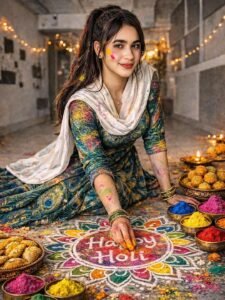
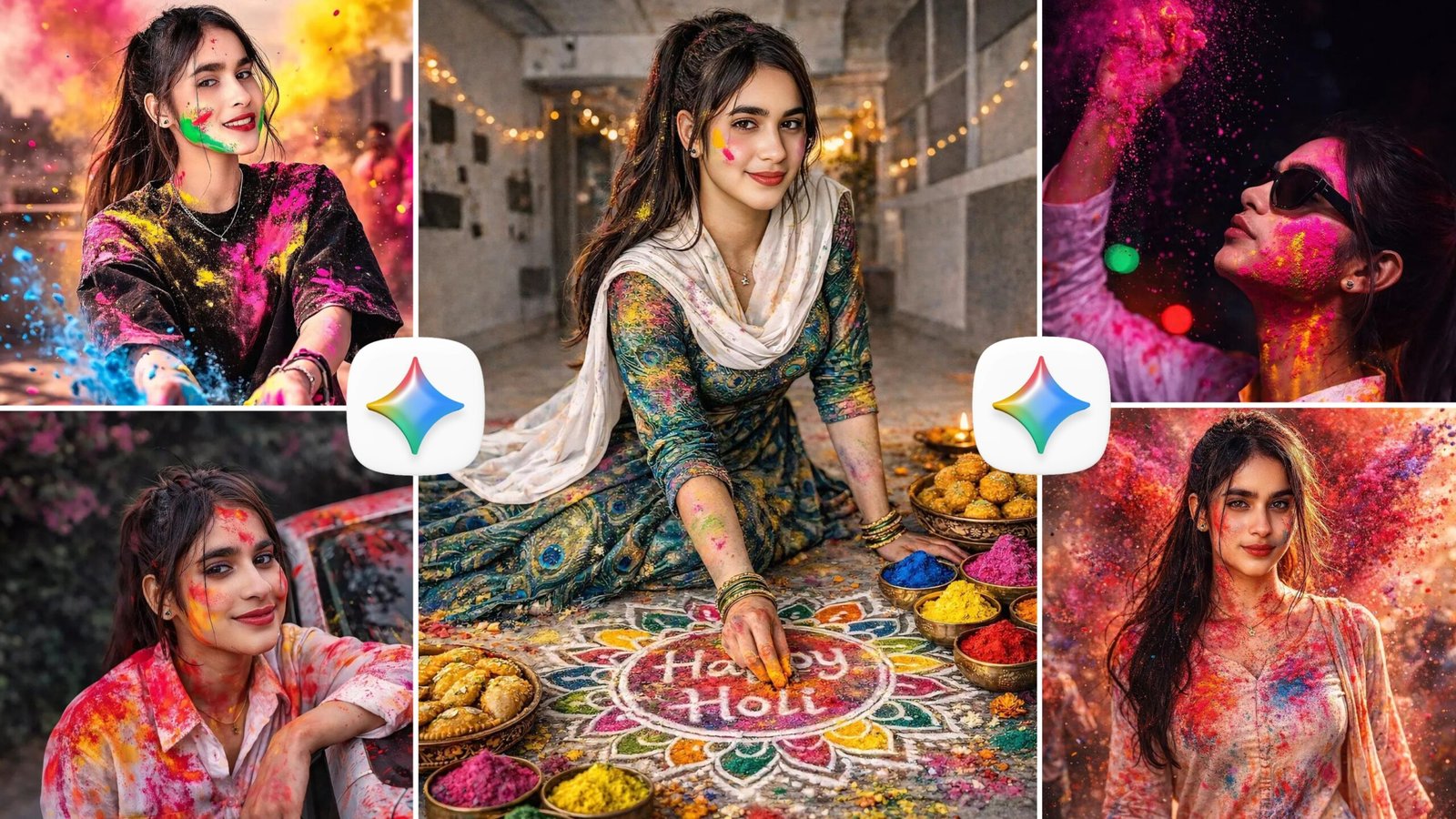
Create a ultra-HD hyper-realistic portrait in 8k high resolution quality of this girl (as in uploaded image) with dark brown hairs wearing peacock print gown making 'Happy holi' rangoli on the floor with holi colours and some Indian festival foods like guziya laddu placed next to her. Some colour applied on her cheeks and clothes and hairs also. Use original face and facial features as in uploaded image. (DON'T FORGET TO MENTION WHEN USING MY PRomt) No crop full body image keep my face same 100% as in the reference image
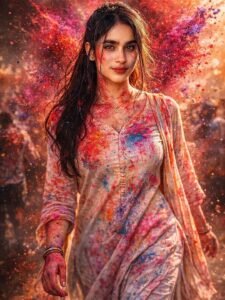
Ultra HD 16K hyper-realistic cinematic portrait of a beautiful Indian girl celebrating Holi festival, same facial features as reference image, single subject only, centered composition, walking forward confidently. Natural wheatish glowing skin with realistic pores visible under layers of vibrant gulal powder. Huge explosive burst of red, magenta, orange and electric blue color powder behind her, frozen mid-air with ultra-detailed particle texture. Heavy organic color splashes across cheeks, neck, hands and outfit. Wet slightly messy hair strands sticking to face. Bold expressive eyes looking into camera, soft intense smile.
She is wearing a light pastel traditional kurta set completely soaked in Holi shades, fabric texture clearly visible, realistic folds and movement. Dramatic golden hour backlight creating glowing rim light around hair and shoulders. Shallow depth of field, creamy bokeh background with festival crowd blurred. High contrast cinematic color grading, RAW DSLR quality
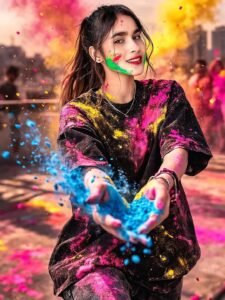
Ultra-realistic Holi festival portrait using my uploaded photo as the face reference: confident young woman smiling with teeth visible, hands mid-motion throwing bright blue powder toward camera, wearing a black oversized t-shirt heavily dusted with neon pink and yellow Holi colors, layered silver chain slightly visible, green powder smeared across jawline, colorful smoke clouds behind him, urban rooftop setting with city skyline softly blurred, no crop full image keep my face same 100% as in the reference image
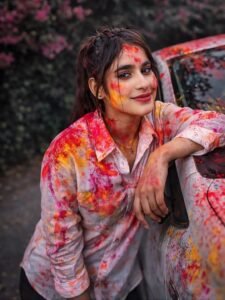
Ultra-realistic candid outdoor portrait of the same young Indian woman from the reference image, celebrating Holi. He is wearing a white button-down shirt heavily splashed with vibrant red, yellow, and pink gulal powder. Не has the same facial features, stylish messy hair.
He is smiling warmly and posing relaxed, leaning one arm on a white car door. The car windshield and hood are also splashed with colorful Holi paint.dark vibe
In the background are flowering bougainvillea bushes with pink blossoms. No crop full image Keep my face same 100% as in the reference
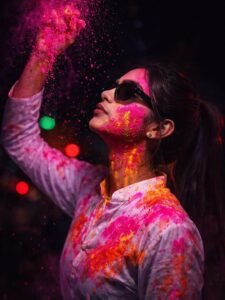
Ultra realistic cinematic Holi night portrait using my uploaded photo as the face reference, side profile pose looking upward, wearing stylish black sunglasses, right hand raised above head releasing vibrant pink powder falling down dramatically, neon pink and yellow Holi colors smeared across face and beard, bright splashes of pink and orange powder on white kurta shirt, intense moody low-key lighting, dark nighttime background with soft colorful bokeh lights (red/green), high contrast, keep my face 100 same as in the reference image
Case Study – एक Reel जिसने 2M Views पार किए
मेरे एक follower ने simple Holi portrait बनाया।
पहले reel पर सिर्फ 800 views आए।
मैंने उसे 3 बदलाव बताए:
- Face focus
- Strong pink color splash
- Slow motion style caption
नई reel upload की।
Result?
2 Million views in 4 days.
यह है strategy।
Holi Gemini Viral AI Photo Editing के लिए Best Color Combinations
अगर आप safe खेलना चाहते हैं, तो ये combinations use करें:
- Pink + Blue (Most viral)
- Yellow + Orange (Festive feel)
- Purple + Cyan (Cinematic look)
- Multi-color burst (Festival vibe)
Avoid:
- Dull brown tones
- Low saturation
- Over blur background
Social Media Algorithm को कैसे Beat करें?
सिर्फ फोटो बनाना काफी नहीं है।
Posting Strategy:
- Reel length: 6–9 seconds
- Hook line पहले 2 सेकंड में
- Caption में emotional line
- Hashtags limited रखें (5–7)
- Cover image bright रखें
Instagram को bright visuals पसंद हैं।
Dark image scroll में खो जाती है।
Engagement Boost करने के Hidden Hacks
मैं हमेशा ये 4 चीजें follow करता हूँ:
- Poll story डालें – “Pink vs Blue?”
- Comment bait – “Guess the AI tool”
- Before/After slide
- Trending Holi song add करें
Music + AI visual = explosive reach.
Holi Theme Ideas जो 2026 में चलेंगे
1. Krishna Holi Cinematic Frame
Soft aura, peacock feather background.
2. Royal Maharaja Holi Portrait
Heavy turban, flying colors, 8K sharpness.
3. Couple Holi AI Frame
Romantic slow motion color throw.
4. Child Playing Holi
Emotional, candid style, natural sunlight.
Mythical Fantasy Holi
Cloud background + divine glow.
AI Photo को Professional कैसे दिखाएँ?
Editing के बिना photo अधूरी है।
Use:
- Snapseed → Sharpness + Contrast
- Lightroom → Color grading
- CapCut → Reel export
Quick Editing Formula:
- Clarity +10
- Vibrance +20
- Highlights -15
- Shadows +10
बस इतना काफी है।
Beginners के लिए Simple Workflow
अगर आप बिल्कुल नए हैं, तो यह follow करें:
- Concept clear करें
- Gemini से detailed scene description लें
- Image generate करें
- Basic color correction करें
- Reel बनाकर upload करें
Consistency रखिए।
पहली reel viral न भी हो, तीसरी होगी।
High RPM Strategy (Website Owners के लिए)
अगर आपकी AI prompt website है, तो:
- Comparison article लिखें
- Trend analysis डालें
- FAQ section add करें
- Table + bullet use करें
- 1500+ words content रखें
Long content = High dwell time
High dwell time = Better Ad RPM
Holi Gemini Viral AI Photo Editing में भविष्य क्या है?
AI हर साल realistic हो रहा है।
2026 में trends होंगे:
- Hyper realistic splash
- Motion AI portraits
- AI generated Holi short films
- Personalized festival avatars
जो अभी सीख लेगा… वही आगे रहेगा।
Final Thoughts – क्या Holi Gemini Viral AI Photo Editing सच में काम करता है?
हाँ।
लेकिन सिर्फ tool से नहीं।
Strategy + Creativity + Timing = Viral.
अगर आप सच में 2026 में ट्रेंड पकड़ना चाहते हैं, तो Holi Gemini Viral AI Photo Editing को smart तरीके से use करें। Detail पर काम करें। Emotion डालें। Lighting समझें।
मैंने खुद देखा है — सही execution से small creators भी लाखों views ले सकते हैं।
अब आपकी बारी है।
FAQs – Holi Gemini Viral AI Photo Editing
1. क्या Gemini से direct image बनती है?
Gemini scene description और creative direction देता है। Final image AI image generator से बनती है।
2. क्या beginners भी viral हो सकते हैं?
हाँ। अगर concept strong है और execution सही है।
3. कौन सा color सबसे ज्यादा viral होता है?
Pink + Blue combination सबसे ज्यादा perform करता है।
4. Reel कितने सेकंड की होनी चाहिए?
6–9 सेकंड best perform करती है।
5. क्या AI photo editing legal है?
हाँ, जब तक आप copyrighted content misuse नहीं करते।